

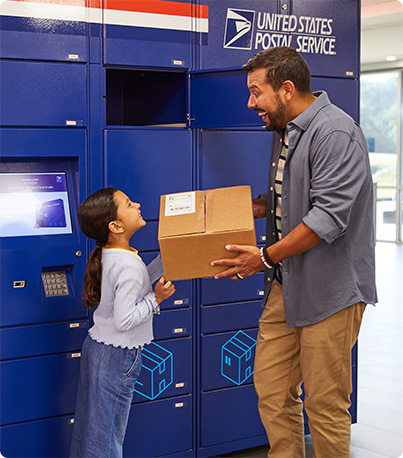
USPS Smart Locker with 55 package compartments; a screen, scanner, and keypad; and an open compartment with a USPS Priority Mail package in front of it.

USPS Smart Lockers

A free, secure, and convenient package delivery and returns alternative.

Ship and receive packages at fully automated, self-service USPS® Smart Locker kiosks available at Post Office™ locations across the country.

Find a Smart Locker
Why Smart Lockers?

Boost your confidence in every delivery with USPS Smart Lockers—the safe, secure, and reliable way to send and receive packages.

Package Shippers

  • Peace of Mind: Ensure that your precious or sensitive packages are received safely.
  • Convenience: Make it easier for your recipient to receive their package when it’s most convenient for them.
  • Flexibility: Send using USPS Click-N-Ship® service or from a self-service kiosk.

How It Works

  • Send packages to people via USPS Smart Lockers by using Click-N-Ship or self-service kiosks.

Package Recipients

  • Enhanced Security: Rest easy knowing your package was delivered to a secure USPS Smart Locker location.
  • Self-Service: Skip the line at the Post Office and retrieve your package using a QR Code®1 sent to your email.
  • More Flexibility: Retrieve your packages at a time that works for you—anytime, anywhere.

How It Works

  • When a package is delivered to a Smart Locker, you’ll get an email with a Pickup QR Code and instructions.
  • Bring the email on your phone to the Smart Locker and scan the QR Code to get your package.

Benefits for Businesses

  • Decrease Costs: Reduce expenses associated with missing or stolen packages.
  • Boost Customer Experience: Provide customers a self-service tool that offers flexible shipment options and a tailored digital experience.
  • Build Brand Loyalty: Reduce customer anxiety over high-value or sensitive packages by ensuring they are received safely.

How It Works

  • If your business uses USPS Ship APIs or a third-party ecommerce platform integrated with USPS Smart Lockers, you can customize your checkout flow to ship directly to Smart Lockers.

USPS Local XChange

Replace in-person handoffs with Smart Lockers using USPS Local XChange™ to make contactless, secure, and convenient local merchandise exchanges.

  1. Sellers: Complete the transaction with your buyer. Get the buyer’s name and email address.
  2. Sign into your USPS.com account, go to Click-N-Ship's "Create a USPS Local XChange™ Label," and find a Smart Locker location (must be within 50 miles of your return address).
  3. Click "Drop Off Here," enter all required info, and pay a low flat fee.2
  4. Download the Label Broker® QR Code and take it with your package to the Smart Locker location.
  5. At the Smart Locker, scan the QR Code, print your label, apply it to the package, and put the package in the Smart Locker compartment.
  6. Buyers: Get an email with instructions and a Smart Locker Pickup QR Code.

Learn More

Two people retrieving a package from a smart locker.

1. QR Code® is a registered trademark of Denso Wave Incorporated. Back ^
2. See current price, listed as USPS Connect Local Flat Rate Box. Back ^