



Web Tools APIs Retired January 25, 2026
Migrate NOW to USPS APIs
The USPS Web Tools API platform was retired on January 25, 2026 and service disruptions are underway. Platform support is sunsetting and availability may be degraded or interrupted at any time. To avoid service disruptions, migrate now to the new USPS APIs.
The functional equivalents of the Web Tools APIs are now available in the USPS API Catalog: USPS APIs Developer Portal.

Get Transition Help from a Human
Contact Us by Email or Phone
Technical questions and more information: Contact USPS API Support or call 1-800-344-7779.
Hours of Operation
Monday–Friday: 8 AM–8:30 PM ET
Saturday: 8 AM–6PM ET
Closed: Sunday and Postal Holidays

How to Switch to USPS APIs
I'm a Web Tools API Developer
- Sign up for USPS APIs.
- Use the API mapping spreadsheets to map your current Web Tools APIs to the corresponding USPS APIs.
- Refer to the help resources below and contact us if you need more help.
I Use a Third-Party Platform
- Call or email your service provider to confirm they are migrating to USPS APIs. Only register for the legacy Web Tools APIs if your vendor or platform requires it.
- Tips on how to spot a migration-ready vendor:
- References to "modernized USPS APIs" or "USPS REST APIs"
- Instructions to Get Started on the USPS Developer Portal
- Mention of the USPS APIs endpoints starting with https://apis.usps.com
Migrate to USPS APIs: Self-Serve Resources
Mapping Web Tools APIs to USPS APIs
Use our mapping resources to help you transition to the new APIs you need for your platform.
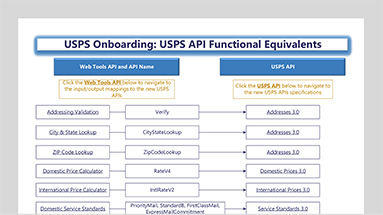
Start with the clickable USPS API Functional Equivalents chart (PDF).
To use the USPS API Functional Equivalents chart:
- Find the Web Tools APIs you use.
- Click a Web Tools API name to get its Excel mapping spreadsheet.
- Each spreadsheet will show how the input/output fields in your legacy Web Tools APIs map to the new USPS APIs.
- Click the USPS API name to view the full specification in the USPS API Catalog.
Direct links to the USPS API input/output field mapping spreadsheets:
- USPS Address API - Web Tools Mapping.xlsx
- USPS Carrier Pickup API - Web Tools Mapping.xlsx
- USPS Domestic Label API - Web Tools Mapping.xlsx
- USPS International Label API - Web Tools Mapping.xlsx
- USPS SCAN Form API - Web Tools Mapping.xlsx
- USPS Tracking API - Web Tools Mapping.xlsx
- USPS Price API - Web Tools Mapping
- USPS International Price API - Web Tools Mapping
- USPS Shipping Options API - Web Tools Mapping
- USPS Service Standards API - Web Tools Mapping
- USPS Location API - Web Tools Mapping

Legacy Web Tools API Resources (shut down January 25, 2026):
- Web Tools 2026 Release Notes (PDF)
- Web Tools Documentation & Updates
- Only register for the legacy Web Tools APIs if your third-party software vendor or platform requires it. All other users should register for the new USPS APIs. Current Web Tools APIs users must transition off as soon as possible. Don’t delay; make the switch today!